
CAPTCHA Scam
CAPTCHA scams use fake “I’m not a robot” checks, verification pages, browser prompts or technical fixes to make you run dangerous actions yourself.
Key warning
A real CAPTCHA should not ask you to press Windows keys, paste commands, download files, allow notifications or run anything.
If a page tells you to copy text, open Run, Terminal, PowerShell, Command Prompt or install something to prove you are human, treat it as dangerous.
Fake verification alert
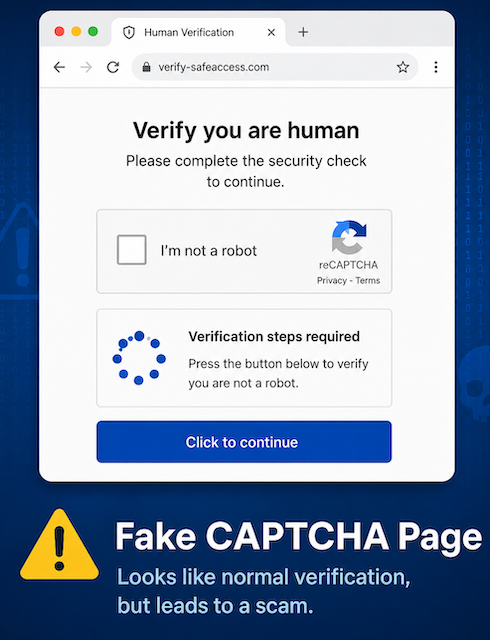
“Verify you are human.”
Fake CAPTCHA pages look familiar and safe, but they may be designed to make you copy, paste, run or allow something harmful.
Common trick
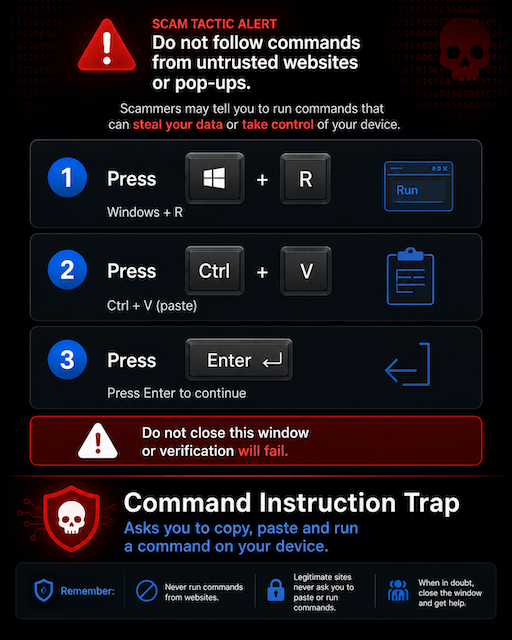
“Press Windows + R, then Ctrl + V, then Enter to continue.”
Common fake reason
“Your browser verification failed. Complete this quick fix.”
Notification and alerts
SCAMAdvisory.net is able to show trust
Before you click - run the site through our system.
What is a CAPTCHA scam?
A CAPTCHA scam is a fake human-verification page that pretends to check whether you are a real person. Instead of simply asking you to tick a box or identify images, it may ask you to perform unusual steps.
Those steps can include copying text, pasting commands, allowing browser notifications, installing software, downloading a file, or entering login details. The goal may be malware infection, credential theft, notification spam, account takeover or payment fraud.
ScamAdvisory rule
Verification should never require you to run commands on your device.
Why CAPTCHA scams work
CAPTCHA screens are familiar. Most people have learned to trust them as a normal part of using the web. Scammers exploit that trust by copying the look and feel of real verification pages.
The page may claim that verification failed, the browser needs fixing, or access is blocked until you complete extra steps. This turns a normal security habit into a trap.
Common places they appear
• Compromised websites.• Fake download pages.
• Streaming, cracked software or adult-content sites.
• Malicious adverts and redirect chains.
• Phishing emails, fake documents or suspicious links.
The danger is hidden inside the “verification”
Fake CAPTCHA pages can look simple, but the requested action may expose your device, browser, accounts or personal information.
Copy-paste command trap
The page tells you to copy, paste and run a command to prove you are human.
Windows Run instruction
You are told to press Windows + R, paste something, then press Enter.
Notification permission abuse
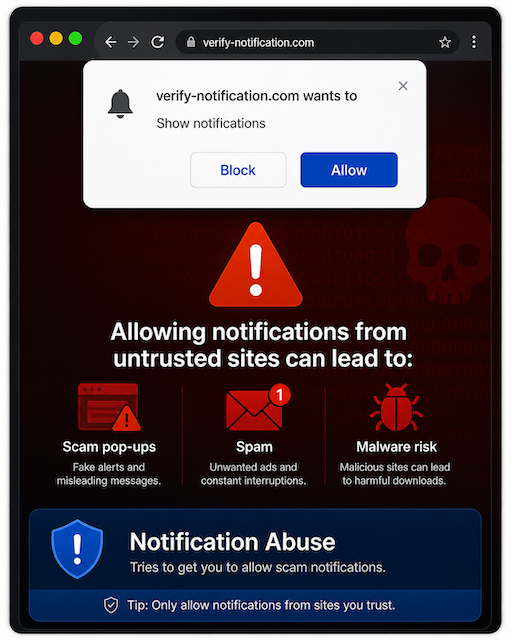
The page asks you to allow notifications, which can later be used for scam pop-ups and fake alerts.
Fake download prompt
You are told to install a browser update, plugin, verification tool, media player or security fix.
Login harvesting
The fake verification leads to a login page asking for email, social media, bank or work credentials.
Malware delivery
The action installs an infostealer, remote access tool, browser hijacker or other malicious payload.
Stop before you prove you are human
A CAPTCHA should not ask you to do technical tasks outside the browser. If it does, leave the page.
Risk level
Critical
Keyboard instructions
The page tells you to press key combinations such as Windows + R, Ctrl + V or Enter.
Clipboard instructions
You are told to copy text or paste something that you cannot clearly understand.
Command line request
The page asks you to open Terminal, PowerShell, Command Prompt, Run or another system tool.
Download required
You are asked to download a file, browser update, plugin, extension or verification tool.
Notification request
The site says you must allow notifications to prove you are not a robot.
Suspicious page source
The CAPTCHA appears after clicking a strange advert, email link, shortened URL or unexpected redirect.
Leave the page. Do not run the instruction.
Close the tab if a CAPTCHA asks you to run commands, paste text, download files or allow notifications.
Do not paste unknown text into Run, Terminal, PowerShell, Command Prompt, File Explorer or your browser address bar.
If you allowed notifications, remove the website from your browser notification permissions.
If you ran a command or installed anything, disconnect from the internet and run a full security scan.
Change important passwords from a different trusted device, especially email, banking, social media and work accounts.
Contact your bank or workplace security team immediately if you entered details or suspect your device is compromised.
ScamAdvisory
Do not let a fake verification page control your device.
CAPTCHA scams abuse a familiar trust signal. Slow down, leave suspicious pages, avoid pasted commands, and never run anything just because a website says it is part of verification.